What is the difference between HTTP and HTTPS?
HTTP vs HTTPS
What a Strong Answer Covers
- port 80 vs 443
- "TLS
- "certificate
Senior-Level Answer
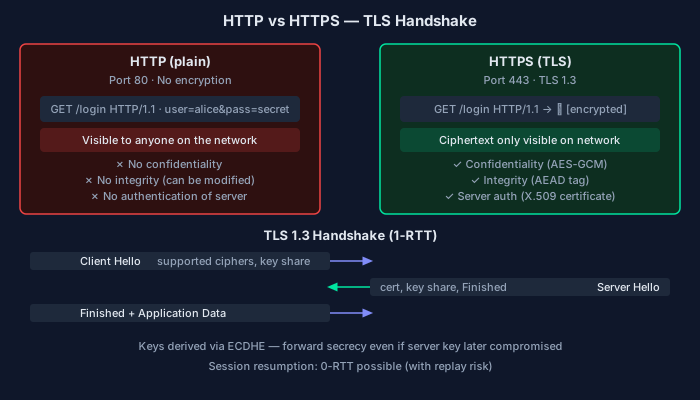
HTTP (Hypertext Transfer Protocol) is the application-layer protocol for transferring web resources — HTML, JSON, images, etc. — between clients and servers. HTTPS is HTTP over TLS (Transport Layer Security). The 'S' stands for secure, and it adds three properties that plain HTTP lacks: confidentiality, integrity, and authentication.
Confidentiality: HTTP transmits everything in plaintext. An attacker who can observe network traffic (on a public Wi-Fi network, through a compromised router, or via ISP-level surveillance) sees headers, cookies, session tokens, and body content verbatim. TLS encrypts the connection with symmetric AES keys established during the handshake, so intercepted traffic is ciphertext.
Integrity: without TLS, an attacker with network access can modify responses in transit — injecting ads into web pages, modifying JavaScript, or changing form data. This is an active man-in-the-middle attack. TLS uses message authentication codes (AES-GCM in TLS 1.3) that detect any modification to the ciphertext.
Authentication: HTTP has no mechanism to verify you're talking to the intended server. HTTPS uses X.509 certificates issued by trusted Certificate Authorities to bind a domain name to a public key. Your browser verifies the certificate chain, ensuring you've reached the actual server and not an impersonator.
Practical implications: cookies sent over HTTP are trivially stolen by anyone on the same network. The `Secure` cookie flag prevents a cookie from being sent over non-HTTPS connections. The `HSTS` (HTTP Strict Transport Security) header instructs browsers to always use HTTPS for a domain, preventing protocol downgrade attacks.
HTTPS adds latency: the TLS handshake requires 1-2 round trips before data flows (TLS 1.3 reduced this to 1 RTT, with 0-RTT resumption for returning visitors). In practice this overhead is small compared to DNS lookup and TCP handshake latency, and HTTPS enables HTTP/2 (which browsers only allow over TLS), which more than compensates through multiplexing and header compression.
HTTPS is now the baseline — browsers flag plain HTTP sites as 'Not Secure', Let's Encrypt provides free certificates, and Google's ranking algorithm favors HTTPS.
Key Differences
| Aspect | HTTP | HTTPS |
|---|---|---|
| Encryption | None — plaintext | TLS — AES symmetric encryption |
| Authentication | None — server identity unverified | X.509 certificates via trusted CAs |
| Integrity | No protection against tampering | AEAD ciphers detect any modification |
| Default port | 80 | 443 |
| Cookie security | Cookies sent in plaintext | Requires Secure flag; HSTS enforces |
| HTTP/2 support | Theoretically yes, practically no | Required by all browsers for HTTP/2 |
| Certificate cost | N/A | Free via Let's Encrypt |
What Separates a 2/3 from a 3/3
2/3 — Passing but Incomplete
Correctly identifies that HTTPS = HTTP + TLS, explains encryption and server authentication as the key additions, and gives a concrete risk example for plain HTTP (cookie theft, MITM).
3/3 — Strong Answer
All of the above plus: distinguishes all three security properties (confidentiality, integrity, authentication), explains HSTS and the Secure cookie flag, discusses TLS handshake latency and how HTTP/2 compensates, and mentions certificate authorities and the trust chain.
Common Mistakes
- Saying HTTPS is just 'encrypted HTTP' without mentioning authentication — missing that encryption without authentication doesn't prevent MITM attacks.
- Not knowing what certificate authorities do or how the browser verifies a certificate — treating HTTPS as a magic secure flag.
- Claiming HTTPS is significantly slower — the TLS overhead is real but small in context, and HTTP/2 typically makes HTTPS faster overall.
- Not knowing HSTS — a common interview follow-up that reveals whether knowledge is surface-level or practical.
Follow-Up Questions
- What is HSTS and what attack does it prevent? — HSTS tells browsers to only connect over HTTPS. Prevents SSL stripping attacks where an attacker downgrades a connection to HTTP before it reaches the server.
- Can HTTPS protect you if the server is compromised? — No — TLS secures the transport. If the server is compromised, the attacker can read plaintext after decryption. TLS doesn't protect server-side data at rest.
- What is certificate pinning and when is it used? — Hardcoding expected cert/public-key hashes in clients to reject valid-but-unexpected certificates. Used in high-security mobile apps; creates operational risk on cert rotation.
- Why do browsers require TLS for HTTP/2? — The HTTP/2 RFC allows plaintext (h2c), but all major browsers chose to only implement HTTP/2 over TLS, effectively making TLS a prerequisite in practice.
Can You Explain This Cold?
Reading the answer is step one. Explaining it unprompted — under interview pressure — is what actually matters. Get AI-graded feedback on your answer with follow-up probes on your weak points.
Get Graded — Free Assessment