What are the 7 OSI layers and what does each do?
OSI Layers
What a Strong Answer Covers
- All 7 named with at least one protocol each
Senior-Level Answer
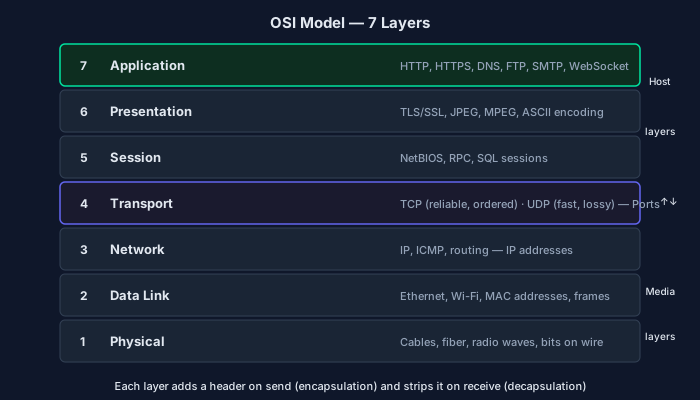
The OSI (Open Systems Interconnection) model is a conceptual framework that divides network communication into 7 ordered layers, each providing services to the layer above and consuming services from the layer below. While real protocols (TCP/IP) don't map cleanly onto OSI, the model remains the standard reference for discussing network behavior.
**Layer 1 — Physical**: Transmits raw bits over a physical medium (copper, fiber, radio). Defines electrical signals, cable specs, pin layouts. Examples: Ethernet physical layer, USB, Wi-Fi radio.
**Layer 2 — Data Link**: Frames bits into data units, handles node-to-node delivery on a single network segment. Provides MAC addressing and error detection (CRC). Examples: Ethernet (MAC frames), Wi-Fi (802.11), ARP. Switches operate here.
**Layer 3 — Network**: Routes packets across multiple networks using logical (IP) addresses. Handles path selection and packet forwarding. Examples: IP (v4/v6), ICMP, routing protocols (OSPF, BGP). Routers operate here.
**Layer 4 — Transport**: Provides end-to-end communication between processes. TCP gives reliable, ordered, connection-oriented delivery with flow control and congestion control. UDP gives unreliable, connectionless, low-latency delivery. Port numbers live here—they identify the receiving process.
**Layer 5 — Session**: Manages sessions between applications—establishing, maintaining, and terminating dialogues. Handles session recovery after interruptions. In practice, this layer is mostly subsumed by Layer 7 protocols or TLS. Examples: NetBIOS, RPC session management.
**Layer 6 — Presentation**: Translates data between network format and application format: character encoding (UTF-8 vs. ASCII), encryption/decryption, compression. TLS encryption is sometimes placed here. In practice, often merged with Layer 7.
**Layer 7 — Application**: The topmost layer—the protocol the application directly uses. Examples: HTTP, HTTPS, DNS, SMTP, FTP, WebSocket.
The practical interview framing: when debugging network issues, OSI layers guide troubleshooting from physical connectivity up. 'Is it a Layer 3 problem (routing)? Layer 4 (port blocked by firewall)? Layer 7 (application misconfiguration)?' Load balancers operating at Layer 4 route by IP/port; Layer 7 load balancers inspect HTTP headers for smarter routing.
What Separates a 2/3 from a 3/3
2/3 — Passing but Incomplete
Correctly names and describes all 7 layers with examples, distinguishes Layer 3 (routing) from Layer 4 (ports/transport), explains TCP vs. UDP at Layer 4.
3/3 — Strong Answer
Correctly places real protocols at their layers, explains where switches vs. routers operate, describes TCP reliability mechanisms at Layer 4, explains Layer 5/6 are practically merged into 7, and applies the model to a practical troubleshooting or load-balancer scenario.
Common Mistakes
- Placing TLS at Layer 7 — it's more accurately Layer 5/6 or between 4 and 7 depending on the model
- Confusing switches (Layer 2, MAC) with routers (Layer 3, IP)
- Forgetting that port numbers are a Layer 4 concept — they identify processes, not hosts
- Treating OSI as the actual TCP/IP implementation rather than a conceptual reference model
Follow-Up Questions
- What is the difference between a Layer 4 and Layer 7 load balancer? — L4 routes based on IP/TCP port — fast, no content inspection. L7 reads HTTP headers, paths, cookies — smarter routing (canary deploys, sticky sessions) but higher CPU cost.
- At which layer does ARP operate, and what does it do? — ARP operates at the boundary of Layer 2/3 — it resolves Layer 3 IP addresses to Layer 2 MAC addresses on the local network.
- Why can a firewall inspect traffic at Layer 4 but not Layer 7 by default? — Layer 4 firewall sees IP/port headers only. Layer 7 inspection requires decrypting and parsing the application payload (deep packet inspection), which is computationally expensive and requires TLS termination.
- Explain what happens at each layer when you make an HTTP request. — Application (HTTP request formed) → Presentation (TLS encrypt) → Session (session maintained) → Transport (TCP segment with ports) → Network (IP packet with addresses) → Data Link (Ethernet frame with MACs) → Physical (bits on wire). Reverse on receipt.
Can You Explain This Cold?
Reading the answer is step one. Explaining it unprompted — under interview pressure — is what actually matters. Get AI-graded feedback on your answer with follow-up probes on your weak points.
Get Graded — Free Assessment